Review:
Tech Watch Australia
Review:
Tech Watch Australia
| Pocket
MStation MP3 Player: Date of review: 14/03/2002 Rating: 7.75/10 By: Tim Butler
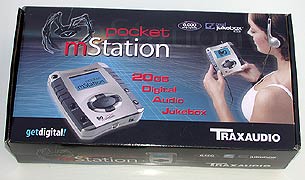
Introduction: As much as the RIAA tried to restrict it, MP3's are here to stay. We are seeing more and more MP3 players released every month, which is a good sign that the consumer market is certainly starting to realise just what MP3's are, and the benefits they provide. The mStation series of players is now available here in Australia (from mStation Australia), and I will be reviewing 2 of the players, with the Pocket mStation being the first. This player is also sold as the Neo 25II, and from what I can tell, the mStation only adds a change of a name.
Features: Here are the features that are listed:
What's Included:
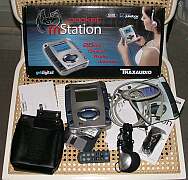
Included in the Portable mStation kit is: Portable mStation, USB Cable, Power cable (and adapter to use the Australian style plugs), carry case, strap, headphones, manual, mStation remote and software. Everything you will need comes with the mStation, and there is also an optional hard drive if you do not wish to supply your own.
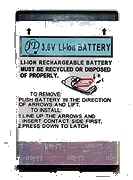
The included lithium ion battery (commonly found in digital cameras / mobile phones) should provide a good battery life, with the only downfall being that you have to search (and probably pay more) a little harder if you ever need a replacement. Luckily, I found this from the Neo website:
This should make tracking down a replacement battery much easier if the original ever dies, or if you are looking for a spare. Storage:
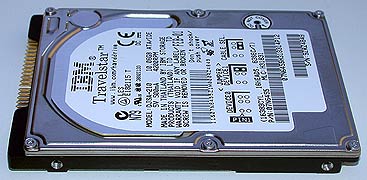
One of the benefits of the Portable mStation is the fact that it uses a laptop hard drive for storage. This provides the MP3 player of a very large amount of storage space, and also offers the benefits of being quite compact. The only drawback that it does add is slightly increased heat output (not that great of a worry) and a fair jump in price (about AU$350 for a 20Gb drive). Access times are also quicker than reading from a CD, which means that there is less of a delay if you are skipping songs. Usage:
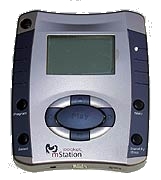
The Portable mStation has a very basic control layout, which I found to be very easy to use. The large navigation buttons are easy to locate even when you are not looking directly at it. The actual "Stand By" feature to be an interesting idea, but if I wasn't using the player I preferred to switch it off.
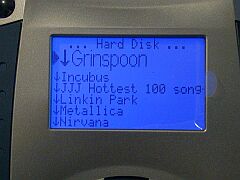
With a good blue backlit display, the Portable mStation was easy to read and navigate. To select a song you simply navigate through the directories on the hard drive, and select the one you want to view the contents of.
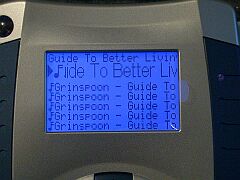
Then, you simply scroll through the list of songs, with the selected one being in a larger font to aid in reading the name. It also scrolls back and forth, allowing you to read song names that are longer than what the screen can display.
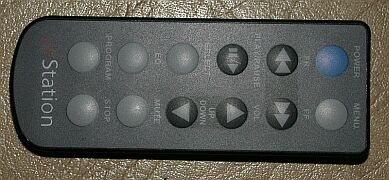
The included remote was certainly very small, and worked well. I did have a conflict between my Yamaha remote and the Portable mStation, which paused every time I tried to turn the volume up on my amplifier. While it was annoying for me, the majority of people who use it shouldn't have any trouble at all. I resolved the problem by sitting the ir receiver so that it was facing the wall, and then just pointed the mStation remote at the wall when I needed to use it. Sound Quality : For a portable player, the mStation does a fairly decent job of reproducing music. When hooked up to my home theatre, it was quickly obvious that the player was lacking bass, and it's something that you would notice if you intend to use something other than the included headphones. The lack of bass is listed as a fix in the next flash ROM, so it's good to see that the problems are being addressed. The included EQ settings where a little weak, and didn't provide much of an enhancement. With the included headphones it didn't make a huge difference anyway, and something that's best left up to the amplifier if you ever hook the player up to one.. It also allows a custom setting, whereby you can manually set the bass and treble levels. Physical Appearance:
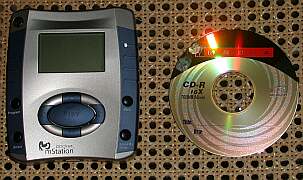
The aesthetics of the player are quite good, with the buttons large and easy to find and the bright blue LCD clear to read. The silver colour combined with the blue LCD matched well, and was pleasing to the eye. From previous pictures that I had seen on the 'net, I was expecting the Portable mSation to be a little smaller than it actually was. This does make the player slightly too big if you are planning to buy one to jog (or similar) with.
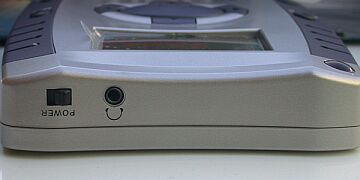
The line-out, USB and power connectors were all placed at the bottom of the player, with the main power switch and headphone socket located at the top. PC Software / Interface: A CD is included containing the know outdated Real Jukebox. Thankfully the player itself doesn't need any drivers installed, meaning that you can use the MP3 Ripper of your choice. Use of the USB port is excellent for connectivity, and doesn't require any drivers to function. The Portable mStation comes up as a removable drive, and it's as simple as dragging a dropping the mp3's onto the drive. This also gives it the added benefit of being able to store any files on the drive, and not just MP3's. The only limitation in the connectivity is the actual speed of the USB interface itself. Filling a 20Gig drive certainly isn't quick over USB, and it's certainly something you don't want to sit around waiting for. In general use though, it won't be often that you will completely wipe the full capacity of the drive and refill it again. When compared to the first MP3 players that used the parallel port, the USB interface is a godsend. Headphones:
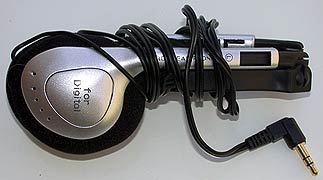
As with most of the MP3 players I've reviewed, the included headphones weren't anything very flash at all. The stereo separation was quite good, but the frequency response was greatly lacking, especially in the bass department. Purchase of a better set of headphones would be ideal to take better advantage that the Portable mStation can offer.
Although the idea of having compact headphones sounds like a good idea, when put to use it means that the headphones are quite flimsy. For me personally the headphones didn't stay comfortable on my head, and I would have preferred the "ear bud" style headphones if I needed something compact. Overall Quality : The player felt solidly constructed, and it's easy to see that it is a good quality product. The Portable mStation comes with a pretty well bundled package, and things like the protective case are a very nice addition. MP3 players are a still a dear investment when compared to a discman, so it's always good to know that you are getting good value for money, while still getting a quality product. Cost: The Portable mStation is sold here in Australia for AU$495 for the bare unit, or AU$695 with a 10G hard drive included (AU$749). The base price for the unit comes at a very reasonable price (mid-range for MP3 players), but unfortunately laptop hard drives aren't very cheap. This adds a significant cost increase when purchasing, and is something to consider if you are looking to buy this player. Conclusion:
Overall, the Portable mStation does the job quite nicely. Personally I think it's a little too big for jogging or sporting use, but an excellent size if you need to travel with a bag that the mStation can be stored in. I really liked the idea of it using a laptop hard drive, as this offers a lot larger storage over the flash cards, and even CD media. In terms of other players using the hard drives, the mStation is competitively priced, and offers the benefits of being able to swap the hard drive (where as the Creative Nomad can't). A special thanks to mStation Australia for loaning me the player for review. Rating: 7.75/10 Pros: * large storage support
(laptop HDD) Cons: * headphones aren't
much good |
||||||||||||||||||||||||||||||||||