 mStation
Home Review: MP3.com
mStation
Home Review: MP3.com
NEO Home Jukebox

Rating 5 = Great Product
After coming back to impress us with a redesigned NEO Jukebox (formerly called
the NEO 25), SSI America does it again with the NEO Home Jukebox.
This slide-in/slide-out docking station with MP3-playing hard drive is a three-way treat:
Buy it as is and use it to load 30GB or 60GB of MP3s from your PC via a USB port. Then play them through your home stereo or amplified speaker system using the included infrared remote or onboard function keys. Get an optional PC bay for $30 so you can slide the Home Jukebox directly into your PC and use it as another hard drive. It accepts any size 3.5-inch EIDE/Ultra DMA hard disk. File copying this way is 20 times or more faster than USB. Invest in the NEO Car Jukebox so you can slide the drive into its trunk-mounted frame, use the Jukebox's corded LCD remote and listen while you drive for years on end.
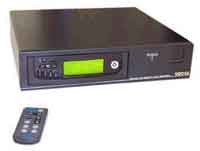
Setting up and using the NEO Home Jukebox as a home stereo MP3 player is very simple. Install the USB driver on your PC, plug in the cable and use Windows Explorer or another file-management program to copy MP3s or MP2s from your hard drive. To track down songs quickly, though, you'd be wise to put them in folders named by artist, year, decade, genre or other categories you're comfortable with. Then they'll show up quickly on the NEO's greenish LCD, and you can dive further into each folder by pressing the navigation buttons on the faceplate or the remote. Playlists are supported.
Use the included RCA stereo jacks to connect to the AUX input on your amplifier and you're in business. Output quality depends on your stereo system and speakers, or course. But we were more than happy with the quality emanating from our modest home system.
SSI America did a good job of redesigning the front panel of the Home Jukebox, a reincarnation of the NEO 35 home/car player. Gone is the navigational jog dial, which was too easy to press in the wrong spot. In its place are individual function keys for forward/reverse, volume, play mode, EQ and directory diving. The Home Jukebox does a fine job of playing your MP3s with plenty of volume, supporting encoding rates of 8-320kbps (including VBR).
A few caveats are in order:
- The small remote has decent range, but you probably won't be able to read the four-line LCD from across the room. The letters aren't as big and the brightness not as intense as those on major-brand electronics. But since the Home Jukebox supports file names and ID3 tags, it's a pretty good tradeoff.
- Not only does the docking station have a loud internal fan, but so does the drive! Don't expect total silence when playing your tunes. We disconnected the docking station fan, which helped some, but left the other fan in to avoid the possibility of overheating.
- While the unit is hot-swappable in USB mode, it definitely is not when used as a hard drive. We came up with a routine. When using in the home docking station, work from left to right: depress power switch on faceplate, lock drive into station, turn on station power switch. When using with the PC bay, insert drive with faceplate power switch depressed, lock drive into bay, turn on PC. The manual isn't explicit about this. We lost some data in both modes and had to run ScanDisk to clean things up.
- When you use the PC bay, Windows puts a Recycle folder on the NEO -- which means if you delete files, that's where they go before you dump them permanently.
- The USB jack protrudes a bit on the rear of the docking station, as do the power cord and RCA jacks. So it helps to have shelves wider than the NEO, or extra clearance to the wall.
- There's no headphone jack (although the Car Jukebox has one, which doesn't
do you much good since it's in the trunk).
We had no trouble copying files via USB on a notebook PC at home, and via the hard drive bay on a PC at work. And since you can put any kind of files on the NEO drive, it's simple to bring updated and new files from one location to the other. A convenient snap-in cover is provided to shield the bay opening when the NEO is out of the docking station. And the installation manual is much improved, with hardcopy and PDF versions included.
The big boys of home electronics are still figuring out their strategies for bringing their home-electronics products into the MP3 era -- and haven't gotten much past the MP3/CD player stage. So we say hat's off to SSI America for this innovative multi-use player. It should fulfill your music-storage and playback needs for years -- if not decades -- to come.
Company Hype
The NEO Home Jukebox will change your listening habits, as you can store and organize every song you own on one simple device.You can copy all of your CDs and MP3 files into the device and connect it to your home stereo. The NEO Home Jukebox uses the same technology as the NEO Car Jukebox, but is not packaged with car accessories. It is made out of a high-quality steel-constructed frame. Files are easily transferred via a USB port on the back of the NEO Home Jukebox or you can simply slide the NEO into your computer with the PC bay (an accessory), transfer your songs, and slide it back out and into the NEO Home Jukebox.
Transfers are extremely fast because the device acts as another hard-drive connected to your computer and the USB speed is 1.45Mb a second.
Saturn Computers, 9 Ivanhoe Rd, Merlin Terrace, Hogwood Lane Industrial Estate,
Finchampstead, Wokingham, Berkshire, RG40 4QQ
Tel: 01189 73 33 73 | Fax: 01189 73 53 73 |